A guide to proving outcomes of RISE, AID, and other funded programs with digital badges. Program office adoption guide
Kolleges
Product Verify

can verify,
the same way, with no login

Every badge gets its own verification link.
Recruiters and outside organizations can confirm a credential is genuine without signing up.

1
Scan the QR or open the link
The certificate’s QR code, unique link, or a shared badge all open the verification page.
2
Verification page opens
It opens instantly, with no login or sign-up.
3
Check issuer and criteria
See the issuer, issue date, issue code, criteria, and expiration date.
4
Always up to date
Status changes such as revocation or expiry show on the verification page in real time.
Verification features

What anyone who opens the link
can check instantly

Authenticity, issuer, criteria, and the original certificate, all on one page. The data is stored in open-standard formats.

These screens recreate the actual Kolleges admin and recipient views.
Names, dates, and numbers are illustrative; the badge and certificate images are real ones issued through Kolleges.

01 · Verification page

Open the QR or link, and it’s verified

Along with the issuer, issue date, and issue code,
you can see the criteria: which activities earned which skills.

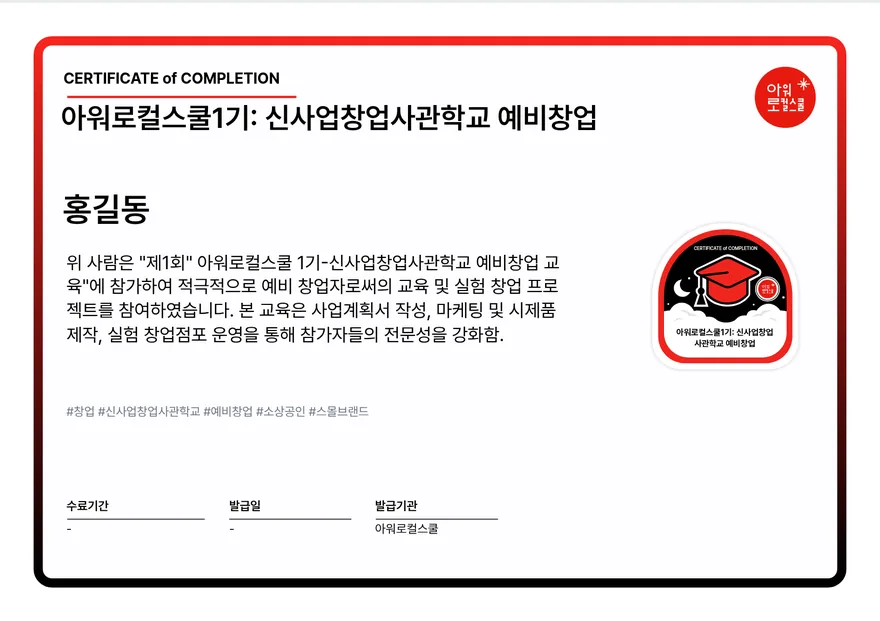
kolleges.net/c/kl-202601-ols1g
This is a valid digital badgeIssuance record and issuer signature verified.
View certificate
Our Local School Cohort 1: New Business Startup Academy
Recipient · Gildong Hong
IssuerOur Local SchoolIssued on2026.01.30ExpiresNoneIssue codeKL-202601-ols1gStandardsOpen Badges 3.0 · W3C VC 2.0
View criteria
Activities
Completed pre-founder training and a pilot startup project
Skills
Business planningMarketingPrototypingPilot store operation
Keywords
#Startup #NewBizAcademy #PreFounders #SmallBusiness
Verifying authenticity
Certificate · Our Local School
Sample screen
Checking criteria and the certificate on the verification page · Issued by Our Local School
  • No login or sign-up
    Recruiters and outside organizations view the verification page without signing up.
  • Every path leads to the verification page
    The certificate’s QR code, unique link, and badges shared on LinkedIn all open the verification page.
  • Live credential status
    Revoke a badge issued by mistake, or let it expire, and the verification page reflects it.
02 · Issuer verification

Trusted issuers are marked “Verified”

Issuers reviewed by the Kolleges team carry the “KOLLEGES VERIFIED” mark.
For co-issued badges, both institutions are shown.

OOO University
Dashboard
Issuers
Design
Credentials
Issuance status
Growth
Website
Pathways & referrals
Courses
Issuance limit 250 / 3,000
Issuer
Only verified institutions show the KOLLEGES VERIFIED mark.
Institution verifiedKOLLEGES VERIFIEDDomain email and registration documents confirmedView verification history
Lead issuerDefault
OOOO UniversityKOLLEGES VERIFIEDUniversityRecipient LinkedIn preview
Additional issuers 1
POO Project GroupKOLLEGES VERIFIEDCo-issuance
Verification history
Domain email verificationConfirmed via oo.ac.kr email
Registration documentsRegistration documents reviewed
Last verified 2026.08.22
Close
How it appears on the verification page
Issuer
OOPOO University · OO Project Group
KOLLEGES VERIFIEDCo-issuance
Sample screen
An admin reviewing verification history · Institution names are illustrative
  • Shown as Verified
    The issuer name appears at the top of the verification page with a Verified mark, adding trust to the credential.
  • Co-issuers on the same screen
    For co-issued badges, both the lead issuer and co-issuers are shown.
  • Manage co-issuers
    Register institutions in the Issuers menu, then select co-issuers in the advanced settings of Create credential.
03 · Open standards

Read the same way on any platform, anywhere

Badges are issued as Open Badges 3.0 and W3C VC 2.0 data,
so the issuer, criteria, and signature read the same on other platforms.
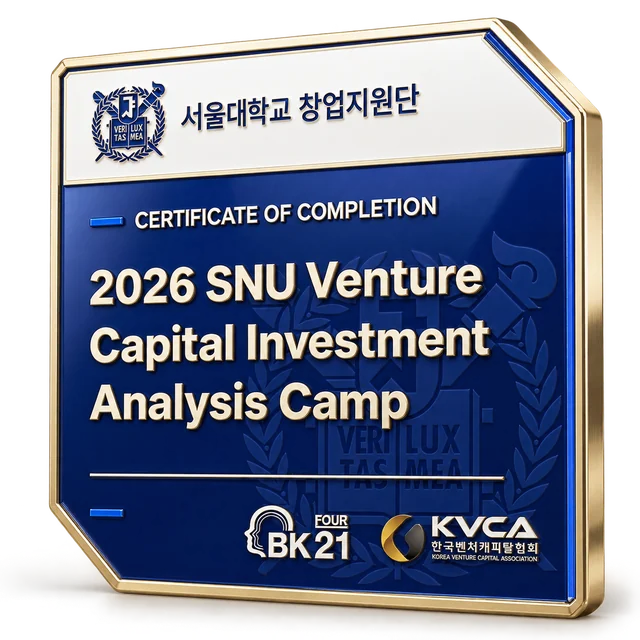
credential.jsonOpen Badges 3.0
1{
2 "@context": [
3 "https://www.w3.org/ns/credentials/v2",
4 "https://purl.imsglobal.org/spec/ob/v3p0/context-3.0.3.json"
5 ],
6 "type": ["VerifiableCredential", "OpenBadgeCredential"],
7 "issuer": { "type": ["Profile"], "name": "SNU Startup Support Group" },
8 "validFrom": "2026-02-27T09:00:00Z",
9 "credentialSubject": {
10 "achievement": {
11 "name": "2026 SNU Venture Capital Investment Analysis Camp",
12 "criteria": { "narrative": "Criteria set by the institution" }
13 }
14 },
15 "proof": { … }
16}
Open-standard format
Issuer info
Criteria as data
Tamper-proof signature
1EdTech Open Badges 2.0·2.1·3.0 certifiedW3C VC 2.0ISO/IEC 27001
Sample screen
The credential.json data inside a badge · Issued by Seoul National University Startup Support Group
  • 1EdTech certified
    Kolleges is an issuing system certified for Open Badges 2.0, 2.1, and 3.0. See the 1EdTech certification list for details.
  • W3C Verifiable Credentials 2.0
    Issuer, recipient, and criteria are stored in a standard format, so other platforms read the same content.
  • ISO/IEC 27001:2022
    The Kolleges digital badge issuance and management system is certified to ISO/IEC 27001:2022 for information security management.

See the real verification screens in a 15-minute demo

We’ll walk through an issuance, verification, and sharing setup that fits your institution.